We'd like to thank CampBrain for their continued support of this great feature of the 2026 event!
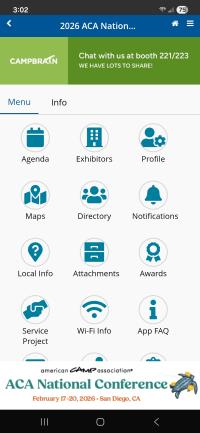
The mobile app will give you instant access to key features, like:
- The full event schedule
- Exhibitors
- Speakers
- Sponsors
- Create your own schedule
- And more...
Major, timely announcements, will be forwarded via "push notifications." We suggest you "allow" this feature when setting up your preferences.
Important Note
You MUST log in to view and use the app on your device. If you do not wish to log in, you may use the web-based version of the app, but some features are only available by logging in.
Steps to Download
For Android and Apple users, search for ACA Conferences in the App Store/Google Play or click the respective image below to be redirected.


You can also access the web-based version of the app from your web browser. Just visit this link to get the app on your smartphone, tablet, or PC.
Getting Started with the App
Follow these steps:
- Open the ACA event in the app.
- Sign in with the email you used for conference registration.
- Create or enter a passcode (password).
- If you’ve used the app for a previous ACA event, you can try that same password.
- If it doesn’t work, create a new one or reset your password.
- Set up your profile.
- Tap Profile to update your information, upload a photo, and adjust your sharing settings.
Results@Hand has a brief video to help you get started.
Note:
- If you were preregistered, you only need to create or enter a passcode.
- If you were not preregistered and have never used the app before, you’ll need to create an account.
Refresh Your App for the Latest Updates
- First time opening the app? Tap the refresh button at the top of the side menu.
- Using last year’s app and having issues? Delete the old version and download the latest one using the links provided above.
Need App Support or Have Questions?
- Check the bottom of the side menu for app FAQs
- Fill out the support form under Help on the side menu
2026 App sponsored by: